Cloud Telephony Solutions
OVERVIEW
MyTelly is a cloud-based call tracking system, that enables automatic lead follow-ups, recording, measuring, and analysis of the calls made on leads by the store staff while in the field or at the desk.
The aim of this project was to solve the problem of digital businesses to help untracked & unanswered phone calls which greatly undervalues the impact of traditional as well as digital Ads on leads and conversions.
ROLE
Research, Workflow, Wireframes, User Interface
TOOLS USED
Figma, Balsamiq
PRODUCT



The Problem
In the current digital era, where E-commerce is expanding, clients use the smartphone to make purchases more often than you even think. Incoming phone calls are a critical component of gaining new business for a variety of companies across multiple industries.
Unfortunately, the impact of traditional, as well as digital ads on leads and conversions, is often untracked and unanswered.

The Process
The development and improvement of new features involves working in close collaboration with a variety of different organisation teams. Customer success and sales were invraising in understanding customers and prospects. The fundamental goal when any project was started was to understand and connect user objectives and corporate objectives.
I observed that the software they use daily could have a great positive effect, with little surprise and delight. This idea drove me to create a creative and enjoyable experience to enhance survey rates.
I proceeded to examine how other companies solved comparable difficulties when the targets were understood. In the CX (customer experience) space, many comparable products provided limited ways analyze data and text.
Establishing Goals
We were able to identify numerous project goals through the formulation of our requirements:
-
Improve the dashboard's usability in order to reduce the frequency of "how-to" help calls, allowing Customer Support to focus on more important issues.
-
Increase user engagement with the dashboard by providing something that allows front-office personnel in small and medium-sized firms, especially in the retail industry, to rapidly view and complete their most important daily duties.
Evaluating Current Pain Points
To help illustrate the development of the product requirements above, I created low-fi wireframes that go into detail about existing pain points our users have.
Based on user feedback that we gathered from Customer Support, we were able to identify some key user needs such as:
-
Needing a better way to visualize and manage the daily calls from the dashboard.
-
Needing more tools that help users to manage all the numerous day-to-day tasks a front desk worker needs to complete


Moodboard & User Interface Design
In terms of the brand aesthetic, the Mytelly just had its logo at the time. We gathered a list of relevant design references after using the Mytelly logo as a springboard in terms of colors and style to settle on a certain look and feel we wanted to achieve.
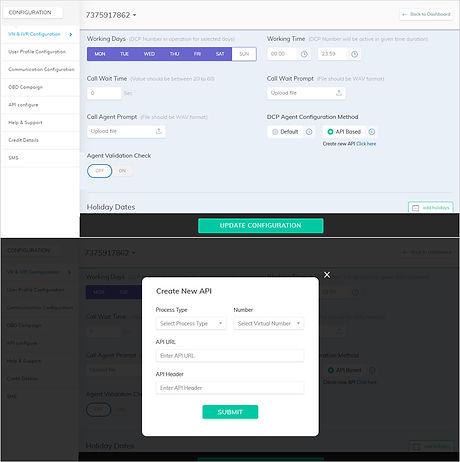
After deciding on a visual style that reflects Mytelly's brand identity, we proceeded to develop the wireframes into the final user interface. This technique included designing for both tablet and desktop platforms.
Implementation
Product team stabilized the existing application, handled a smooth functional modules migration, and enhanced the overall performance of the web application.
The new application’s UX design elements were introduced gradually, without causing any interruptions in the web application’s availability.




The Results
Improving customer experience is an ongoing process
The team continues to expand out the roadmap alongside parallel products to offer greater support in the months following my engagement on the project. The new team refined the design language and applied many of the lessons learned to future projects.
The Customer got a web application with convenient navigation and appealing UX design, which increased user satisfaction. Besides, the cloud data storage allowed accommodating data to cope with the growing customer base more efficiently.
This project taught me a lot in designing with empathy and crafting conversations that are useful and concise. It boils down to knowing the correct context and designing for scenarios like any other design process.