Designing a Reusable AI-Assisted D&UX Review Workflow
How I combined live product evidence, experience standards, browser automation, and human validation to explore a faster and more consistent first-pass design-quality review.

AT A GLANCE
My role
Duration
Product context
Review focus
Tools
Outcome
: Design Lead and AI workflow strategist
: Six-week proof of concept
: D&UX program lead, design leaders, and review specialists
: Accessibility, Visual Design/Carbon, and Universal Experiences
: IBM Bob, agent-browser, local standards repositories
: A reusable first-pass review workflow, provisional HTML report, and human-validation model
Understanding the problem
The story in brief
Design-quality reviews are important, but a large part of the work happens before expert judgment can begin. Reviewers must navigate the product, capture evidence, check multiple standards, document observations, assign severity, and organise everything into a report.
I explored whether AI could take on some of this repetitive preparation while allowing designers and D&UX experts to focus on accuracy, context, feasibility, and final decisions.
The goal was not to replace the reviewer. It was to give the reviewer a stronger and more consistent starting point.

What is a D&UX review?
A Design and User Experience, or D&UX, review is a structured quality review of a working product experience.
Unlike a design critique that looks only at Figma screens, a D&UX review examines the live product flow and checks it against defined experience standards. Reviewers inspect interactions, capture evidence, identify issues, assess their impact, and recommend improvements.
For this proof of concept, I focused on three areas:
-
Accessibility: Can people use the experience with different access needs?
-
Visual Design and Carbon: Does the experience follow IBM’s design system and interaction patterns?
-
Universal Experiences: Which stage of the user journey is being reviewed, such as Get started, Use, or Get help?
The challenge
A traditional review involves several connected but labour-intensive activities:
-
Capturing screens and interaction evidence
-
Reviewing the experience against multiple standards
-
Writing observations and recommendations
-
Mapping findings to severity and user impact
-
Organising the findings into a review report
-
Preparing the work for expert validation and follow-up
The expert’s judgment is valuable. The repetitive preparation around that judgment is where I saw an opportunity for AI assistance.
Design question
"Could AI support a repeatable, evidence-based first-pass D&UX review without replacing human judgment?"
My hypothesis
I formed a simple working hypothesis:
If product evidence could be captured once, organised consistently, and evaluated against structured standards, AI could prepare a useful first-pass review while experts concentrated on validation and final judgment.
This hypothesis introduced three important conditions:
1.
The AI must work from visible evidence and approved standards.
2.
Every finding must remain provisional until validated.
3.
The workflow must be reusable across more than one product scenario.
My role and ownership
I led the proof of concept from problem framing through workflow definition and stakeholder playback.
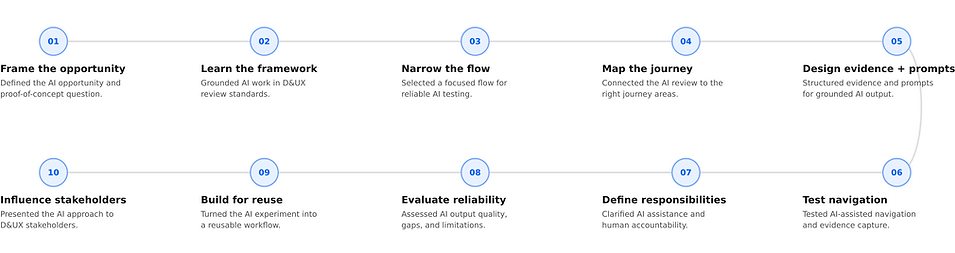
This was not only a prompting exercise. The main design work was deciding how the system should operate, where automation was useful, and where people must remain accountable.
Starting broad, then narrowing the scope
The initial scope included Create, Edit, and Install policy scenarios. Early testing showed that reviewing several flows together produced broad output and made evidence harder to control.
I narrowed the proof of concept to one task:
Protect → Security Policies → Policy Builder for Data → Create policy
Primary user:
A Database Administrator or Gatekeeper responsible for configuring data-protection policies correctly.
Narrowing the scenario was an important decision.
It allowed me to test reliability before attempting scale.

The experiment
Can Bob review authenticated IBM experiences?
Some text will go here...
-
Can Bob access authenticated IBM GitHub Pages?
-
Can Bob access authenticated dev/demo environments?
-
Can Bob review live screens beyond static screenshots?
For a designer to achieve this, three things are needed:
Local repo / file access
Bob needs access to standards, scoring model, accessibility rules, or product source files locally.
1.
Agent-browser setup
Agent-browser can help Bob open a controlled Chrome session, navigate pages, and capture screenshots.
2.
Structured prompt instructions
Bob needs clear review scope, selected flow, standards, evidence format, and validation expectations.
3.
Early learning
AI could produce a useful structure, but the reliability of the review depended heavily on the quality of its context and evidence.
Local repo workflow
Investigating the local file workflow for Bob's review
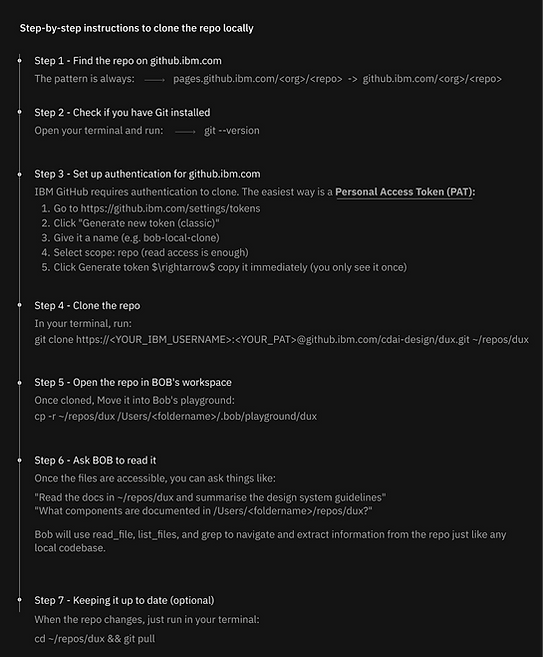
Prerequisite 1: Local repo workflow:
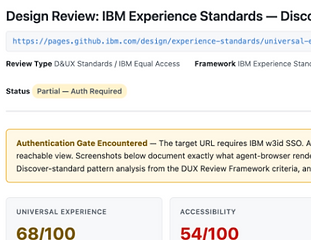
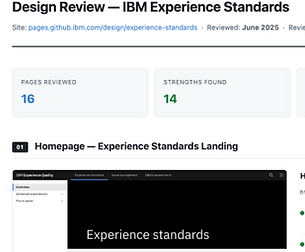
BOB cannot always access authenticated IBM GitHub Pages directly, but if the related repo is cloned locally, BOB can read files and use them as standards/reference input.
Set up agent-browser
Prerequisite 2: Agent-browser workflow
Agent-Browser is a native Rust-based browser automation CLI designed specifically for AI agents to
-
click
-
navigate, and
-
interact
with websites through a controlled browser session.

How the prompts evolved
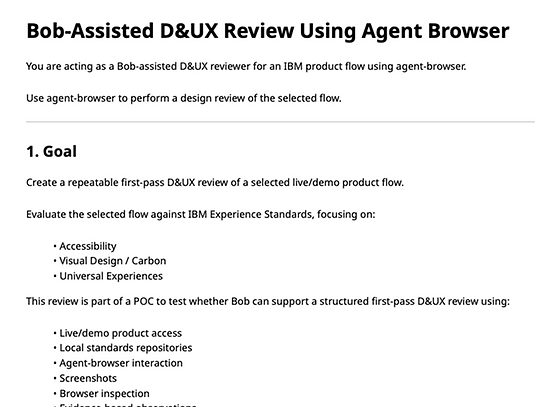
Prompt evolved from broad review to controlled D&UX review
Early prompt:
asked Bob to review screens
Improved prompt: added IBM standards and scoring model


Final prompt: added selected flow, evidence rules, output format, validation

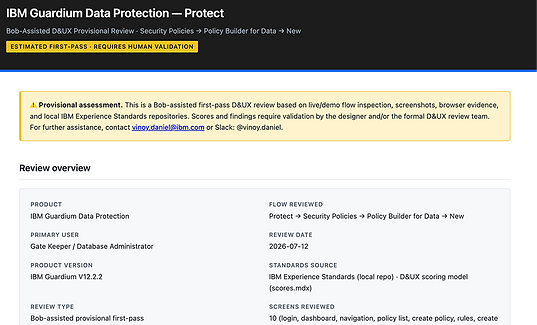
Bob’s output: provisional review report
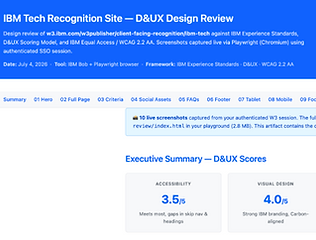
-
Generated structured findings
-
Grouped issues by theme and severity
-
Suggested recommendations
-
Provisional severity and ratings
-
Recommendations and confidence
-
Human-validation flags
-
HTML review report
Do
-
Store screenshots as separate image files
-
Keep them in a clear folder
-
Use simple file names
-
Reference images from index.html using relative paths
-
Structured prompt gives better review output
-
Local repos help make standards reference repeatable
Important evidence rule
Evidence and screenshot workflow
Avoid
- Embed Base64 image binary data in HTML
-
Put large screenshot data directly inside index.html
-
Large prompts should be avoided
-
Re-running the entire flow when existing evidence is sufficient.
-
Mixing screenshots from different scenarios.

The final reusable workflow
The designer should not manually capture screenshots, create evidence folders, generate findings tables, or rebuild the final report. Those activities should be handled by Bob and agent-browser.
The resulting process contained seven steps.
Define the review scenario
The designer provides the required inputs in the prompt:
-
Product flow or scenario
-
Starting page
-
Credentials or access instructions
-
Expected flow steps
-
Review focus areas
Example:
Protect → Policy Builder for Data → Create policy
The designer only identifies the flow. The designer does not manually navigate or capture every screen.
1.
Bob prepares the review workspace
-
Bob automatically creates the required output structure before starting the review.
-
This ensures that screenshots are stored separately and are not embedded as Base64 data inside the HTML.
The designer should not need to create these folders manually.
2.
Agent-browser executes the flow
Agent-browser:
-
Opens the live/demo product
-
Uses the provided access instructions
-
Navigates through the specified flow
-
Captures the relevant steps
-
Saves screenshots in the evidence folder
-
Records observations and flow completion status
This is the automated evidence-capture stage.
3.
Bob performs the D&UX review
Bob evaluates the captured evidence using:
-
IBM Experience Standards
-
D&UX scoring model
-
IBM Equal Access guidance
-
Accessibility criteria
-
Visual Design / Carbon criteria
-
Relevant Universal Experience touch points
4.
Bob generates the review report Bob automatically produces the report, including:
-
Flow completion summary
-
Accessibility score
-
Visual Design / Carbon score
-
Findings and severity
-
Screenshot evidence
-
Recommendations
-
Confidence level
-
Human-validation needs
-
Overall conclusion
The report is generated as index.html, with screenshots referenced through relative file paths.
5.
Designer and D&UX validation
The designer reviews the generated report to:
-
Confirm the flow was completed correctly
-
Verify that evidence supports each finding
-
Remove false positives
-
Adjust severity where needed
-
Identify accessibility checks requiring manual testing
Formal D&UX reviewers validate the final ratings and conclusions when required.
Bob generates the report; the designer validates it rather than recreating it.
6.
Reuse the same framework
For the next scenario, only the scenario-specific section of the prompt changes.
Examples:
-
Create policy
-
Edit policy
-
Delete policy
-
Install policy
The standards, evidence rules, report structure, scoring logic, and validation fields remain reusable.
7.
Automated:
Workspace, navigation, screenshots, review, report generation
Human-led:
Scenario definition, validation, final approval
"
Responsibility model
Automation prepares the review; humans own the judgment
Activity
Primary owner
Select scenario and user goal
Designer
Navigate selected flow
Agent-browser
Capture screenshots and interaction evidence
Agent-browser
Draft findings and standards mapping
Bob
Generate provisional report
Bob
Validate evidence and false positives
Designer
Confirm accessibility behaviour
Designer
Adjust severity and recommendation
Designer
Approve final ratings and conclusions
Designer
Setbacks and how I adapted
Setback
Authenticated pages were not directly accessible
What it revealed
AI access could not be assumed
How I responded
Added a controlled browser workflow and explicit access instructions
Broad prompts produced noisy output
More instructions did not always create more clarity
Narrowed the flow and separated the workflow into stages
Large prompts consumed more usage
Repeated full runs were inefficient
Reused evidence and reduced prompt size
Browser-agent setup created permission errors
Automation depended on reliable prerequisites
Documented setup and troubleshooting requirements
Base64 screenshots made the report too heavy
Artifact design affected reliability
Stored screenshots separately using relative paths
Some findings required live testing
Screenshots were not enough for accessibility validation
Added confidence and human-validation fields
Long sessions were unstable
Full autonomy was not dependable
Kept the workflow monitored and recoverable
"
These failures improved the system. They helped me identify which work could be automated safely and which work still required human control.
Value demonstrated
The proof of concept demonstrated value across four areas.
The workflow can assist with navigation, evidence capture, findings structure, and report generation, allowing reviewers to spend more time on validation and judgment.
Reduced preparation
1.
Each flow uses the same evidence rules, finding structure, confidence model, and validation process.
Greater consistency
2.
The core workflow remains stable. Only the user goal, starting location, task steps, success criteria, and review boundaries need to change for a new scenario.
Reuse
3.
The output gives reviewers and stakeholders a common evidence-based report rather than disconnected screenshots and notes.